
The Lifecycle of a Consumer Device: From Manufacturing to Recycling
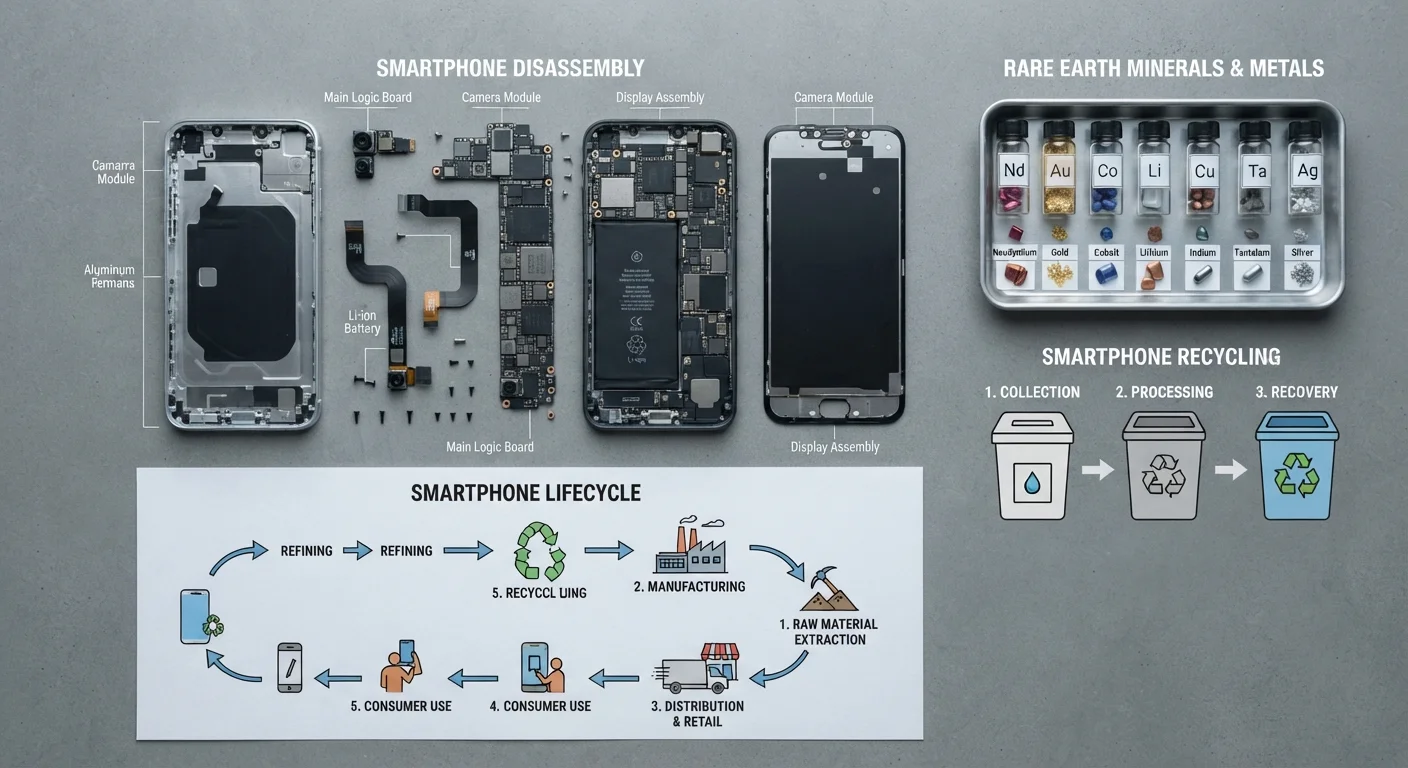
Photo credit: FindersGroove.com | Discover Important Information
In this article
Understanding what happens before and after ownership changes how you think about upgrades. A full picture of a gadget's environmental journey.
Key Takeaways
- Manufacturing accounts for a significant share of a device's total carbon footprint - often more than years of use.
- Extending a device's lifespan by even one to two years meaningfully reduces its per-year environmental cost.
- Most e-waste is not formally recycled; hazardous materials frequently end up in landfill or informal processing.
- Greenwashing is common in tech marketing - look past labels to actual repair and recycling infrastructure.
- Informed purchasing decisions begin with understanding what happens before and after you own a device.
Where Devices Come From: The Manufacturing Phase
Long before a smartphone or laptop reaches a store shelf, it has already accumulated a substantial environmental footprint. Mining the raw materials - lithium, cobalt, rare earth elements - is energy-intensive and, in many cases, associated with significant land disturbance and water use. Semiconductor fabrication requires ultrapure water, specialty chemicals, and enormous amounts of electricity. Assembly, quality testing, and global logistics add further to the total.
Researchers who study product lifecycle assessments (LCAs) - structured analyses of a product's environmental impact from cradle to grave - consistently find that manufacturing can represent anywhere from 50% to over 80% of a smartphone's total carbon footprint over its expected lifespan. That figure shifts depending on how long the device is actually used, but the core insight holds: a device's environmental cost is front-loaded.
50-80%
Share of a smartphone's carbon footprint from manufacturing
Lifecycle assessment research consistently shows manufacturing dominates a smartphone's total environmental impact relative to its use phase.
53.6M tonnes
Global e-waste generated annually
According to the UN's Global E-waste Monitor, less than 20% of this volume is formally documented as collected and recycled.
17+
Rare earth elements used in a typical smartphone
Mining these elements is resource-intensive; recycling infrastructure to recover them at scale remains underdeveloped in most markets.
This matters for how you think about upgrades. Replacing a functioning device with a newer model means triggering that entire manufacturing chain again - for marginal performance gains in many cases. See our full lifecycle purchasing guide for a broader framework on evaluating these trade-offs before you buy.
The Use Phase: Where Most Energy Is Actually Consumed
For devices used over many years - desktop computers, televisions, large appliances - the use phase can rival or exceed manufacturing in total energy draw. A desktop PC running several hours daily accumulates real electricity consumption over a five-year span. Charging habits, display brightness, and background processes all contribute.
For smaller, battery-powered devices like phones and tablets, the use-phase energy footprint is comparatively modest relative to manufacturing - but it still adds up. Wireless data transfer, always-on connections, and push notifications keep radios active even when a device feels idle.
Avoid charging your phone to 100% routinely - keeping lithium-ion batteries between roughly 20% and 80% charge reduces electrochemical stress and slows long-term capacity loss.
Battery researchers broadly agree that partial charge cycles reduce degradation; many device manufacturers have begun building optimised charging modes that apply this principle automatically.
Heat is a battery's primary enemy - keep devices out of direct sunlight and avoid leaving them in hot cars, even briefly.
Elevated temperatures accelerate lithium-ion degradation significantly faster than charge cycle count alone, shortening the realistic lifespan of the battery and the device.
Battery health is a meaningful variable here. Lithium-ion batteries degrade with charge cycles and heat. A battery that holds 70% of its original capacity means the device charges more often and, eventually, becomes the reason for replacement. Our article on habits that extend device lifespan covers evidence-backed routines that genuinely slow this degradation.
Third-Party Chargers and Battery Health
Using uncertified third-party chargers can deliver inconsistent voltage and current, stressing battery cells over time. Look for chargers that carry recognised safety certifications rather than choosing purely on price. The cost difference is small relative to the impact on device longevity.
The Upgrade Cycle: Why We Replace Devices Sooner Than We Need To
Software support windows, planned obsolescence concerns, and persistent marketing pressure combine to shorten the average device lifespan well below what the hardware could support. When a manufacturer stops issuing security updates for an operating system version, continuing to use that device becomes a genuine risk - not a hypothetical one. That's a real structural pressure, not just perceived obsolescence.
At the same time, marketing routinely conflates minor iterative improvements with transformative upgrades. Understanding which product changes are functionally meaningful versus cosmetic is a practical skill worth developing. The guide to recognising greenwashing is useful here - similar critical evaluation applies to upgrade-cycle messaging.
The repair landscape also shapes upgrade decisions. Devices with user-replaceable batteries, available spare parts, and repair-friendly designs shift the economics in favour of keeping existing hardware longer. Regulatory pressure in several markets is beginning to address repairability requirements, though implementation varies widely.
Software Support Windows Are a Hard Deadline
When a device no longer receives security updates, it becomes progressively more vulnerable to known exploits - this is not a marketing concern but a genuine security risk. Factor a manufacturer's published support window into any device decision. Devices that have reached end-of-software-support should not be used for sensitive tasks like banking or accessing personal accounts.
End of Life: What Actually Happens to Old Devices
E-waste - discarded electronics - is one of the fastest-growing waste streams globally. The United Nations University's Global E-waste Monitor has documented that a substantial majority of discarded electronics are not processed through formal, regulated recycling channels. Informal processing, which involves breaking down devices without protective equipment or environmental controls, can release lead, mercury, cadmium, and flame retardants into soil and water.
Formal recycling, when accessible and used, recovers recoverable metals - gold, copper, aluminum, palladium - and safely handles hazardous components. Many device manufacturers operate take-back programmes, and municipal e-waste collection events are increasingly common in US communities. The practical barrier is awareness and convenience: most people simply don't know these options exist or where to access them.
Data security is a parallel concern at end of life. Before any device leaves your possession - whether donated, resold, or recycled - a full factory reset and, for storage-heavy devices, physical drive wiping reduces exposure. Our piece on how devices collect and store data explains what typically persists and what doesn't after a reset.
Certified E-Waste Recyclers vs. Drop Boxes
Not all e-waste drop boxes lead to responsible processing. Look for recyclers certified under programmes such as e-Stewards or R2 (Responsible Recycling), which set documented standards for how materials are handled and where they are sent. Many manufacturer take-back programmes route through certified partners, making them a relatively reliable option.
Making Smarter Decisions Across the Full Lifecycle
Viewing a device as a lifecycle - not a transaction - changes the questions worth asking before and during ownership. Before purchasing, it's worth considering: How long does this category of device typically receive software support? Are spare parts and repair services available? Does the manufacturer publish any substantive environmental data?
During ownership, maintaining devices proactively extends functional lifespan and defers the manufacturing impact of a replacement. At end of life, using certified e-waste channels or manufacturer take-back programmes ensures materials are handled responsibly.
None of this requires perfect consumer behaviour - incremental shifts toward longer ownership and proper disposal at scale have measurable aggregate effects. If you're also thinking about how your broader relationship with technology is structured, the principles for a sustainable digital life piece offers a useful companion framework.
Extend Before You Replace
Before committing to a new device, assess whether a battery replacement, storage upgrade, or software reset would resolve the performance issue driving the upgrade urge. In many cases, a modest repair cost extends a device's useful life by one to two years - significantly reducing its per-year environmental and financial cost.
This article is for general informational and educational purposes. Environmental impact data cited reflects general findings in publicly available lifecycle assessment research; specific figures vary by product, region, and methodology. Consult manufacturer documentation and local regulations for guidance applicable to your situation.

Author
Tech & Gadgets Editorial Team
Tech & Gadgets Editorial Team is the collective byline for our editorial team and contributor network. Articles published under this byline or an editorial pen name are researched, written, and reviewed according to our editorial standards for clarity, consistency, and independence before publication.
View all articles →